
gothic floating castle cnc file: Crescent Moon & Celestial Decor
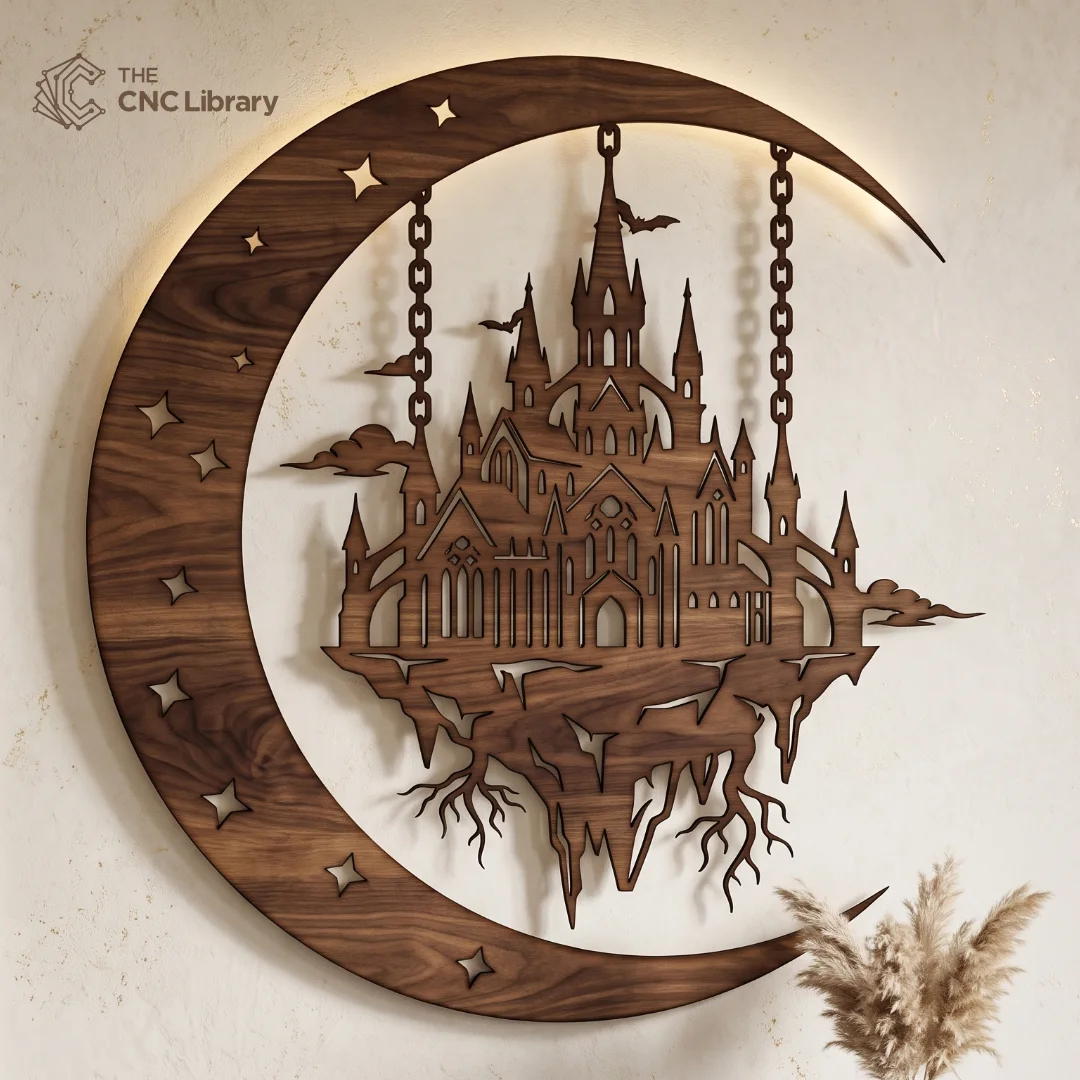
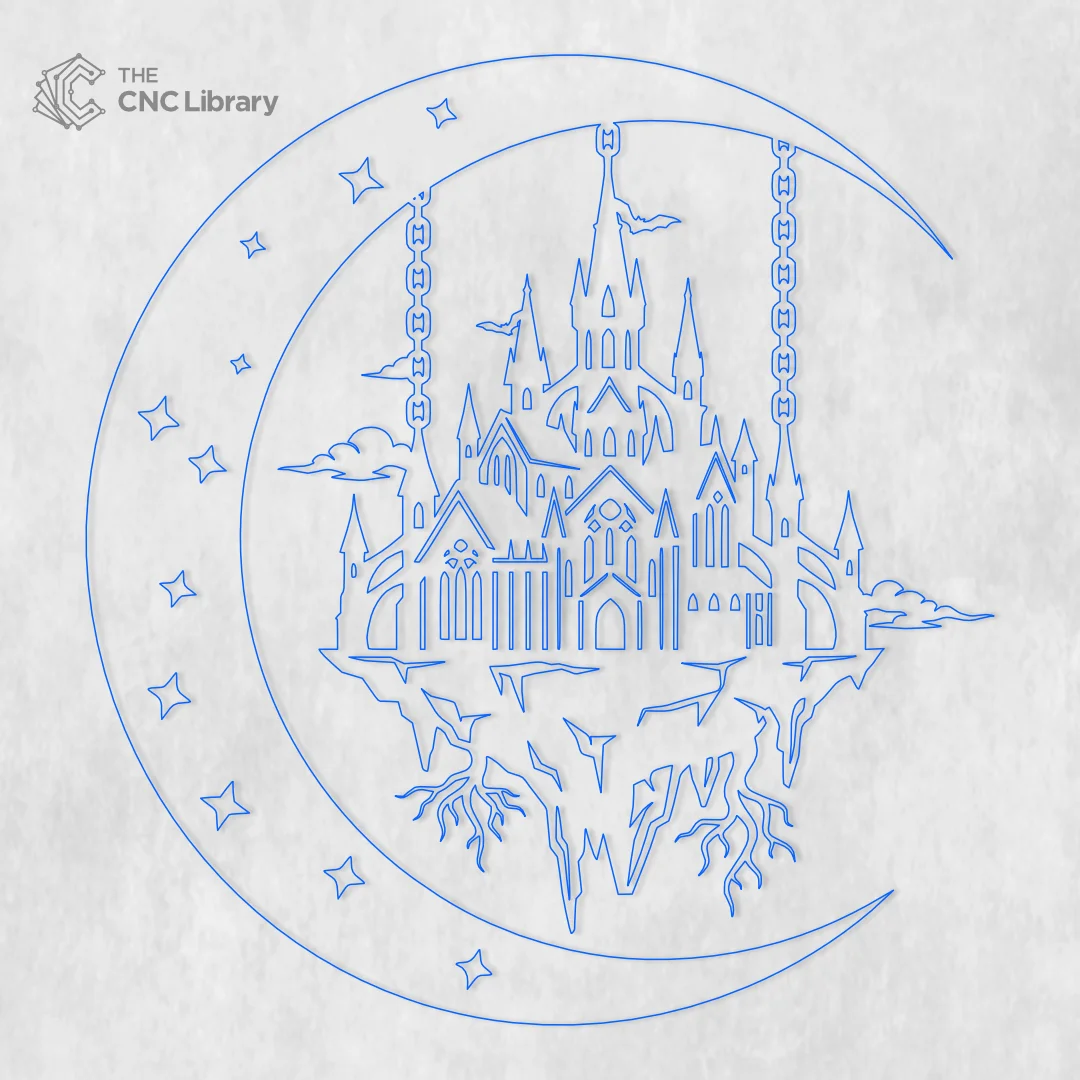
Transform any room into a realm of dark fantasy with our premium gothic floating castle cnc file. The demand for dark academia, gothic interior design, and celestial wall art has surged across European and North American markets. This intricate vector design captures a dramatic, storybook atmosphere featuring a grand cathedral-style castle standing atop a floating, root-laden rock island. The island is suspended by heavy industrial-style chains anchored inside a massive, sweeping crescent moon adorned with cutout celestial stars and swooping bats.
Whether cut from rich dark walnut, sleek black acrylic, or powder-coated sheet metal, this piece serves as a captivating focal point for living rooms, gaming dens, libraries, or themed commercial spaces.
Key Features & Vector Optimization Complex architectural designs can be tricky to cut if the digital file isn’t properly prepped. At The CNC Library, we prioritize technical precision so you can cut with complete confidence.
-
Continuous Structural Bridges: Despite the delicate appearance of the spires, chains, and dangling island roots, all vector elements are connected with structurally sound bridges. This prevents delicate pieces from breaking during cutting or handling.
-
Zero Overlapping Vectors: The artwork has been thoroughly audited to eliminate duplicate lines and stray nodes. Your laser or CNC toolpath will run smoothly in a single pass without unnecessary re-cutting or burn marks.
-
Integrated Crescent Frame: The outer crescent moon acts as both a decorative frame and a solid mounting structure, holding the floating island stably in place while preserving the illusion of weightlessness.
-
High Scalability: Designed in pure vector format, this file can be scaled up for a dramatic 3-foot wall piece or scaled down for smaller framed wall inserts without any loss of detail or edge quality.
Recommended Materials & Thickness Guidelines This design adapts beautifully to a wide variety of fabrication materials:
-
Wood (Hardwood & Veneered Plywood): As shown in our preview images, 1/4″ (6mm) Walnut or Dark Oak veneered plywood produces a rich, classic aesthetic. Baltic Birch plywood (1/8″ or 1/4″) is also ideal if you plan to stain or hand-paint the intricate castle spires.
-
Cast Acrylic: For a sleek modern-gothic vibe, cut the main frame out of 3mm matte black or translucent frosted acrylic. Mounted against a white or brick wall, it produces a sharp silhouette.
-
Sheet Metal (Plasma / Fiber Laser): Cut from 14-gauge or 16-gauge steel, this design makes an imposing outdoor garden or entryway sign. Finish with a rust-resistant matte black powder coat for long-lasting durability.
Production & Finishing Inspiration To maximize the visual impact and retail price of your finished physical product, consider adding integrated LED backlighting.
-
Backlit Halo Effect: Adhere an addressable LED light strip along the back inner curve of the crescent moon. When mounted slightly off the wall using 1/2-inch wall standoffs, the warm halo light accentuates the silhouette of the castle and casts dramatic shadows through the cut-out stars and window arches.
-
Two-Tone Finish: Paint or stain the outer crescent moon a dark matte shade while gilding the star cutouts or castle spires with metallic gold or copper wax for an eye-catching contrast.
Machine Compatibility & Included File Formats This file is fully compatible with all major hobbyist and industrial CNC equipment, including Glowforge, OMTech, xTool, Epilog, Boss Laser, Shapeoko, Onefinity, and Cricut/Silhouette tools. The instant digital download contains an organized ZIP folder with:
-
SVG File: Ideal for LightBurn, xTool Creative Space, and Glowforge web interface.
-
DXF File: Fully compatible with AutoCAD, Vectric VCarve, Fusion 360, and CNC router CAM software.
-
EPS File: Perfect for editing vector nodes or resizing in Adobe Illustrator and CorelDRAW.
-
PDF File: Great for printable visual templates, manual scroll saw cutting, or quick previews.
Step-by-Step Cutting & CAM Setup Guide
-
Download & Extract: Unzip the downloaded file folder on your computer.
-
Import to CAM Software: Load the SVG or DXF file into your cutting software (e.g., LightBurn or VCarve).
-
Scale to Target Size: Ensure your workpiece is sized appropriately. Recommended Minimum Cut Width: 12 inches (300mm) to preserve the tiny window details and thin chain links.
-
Set Toolpaths & Kerf: Assign your cut layers. Adjust speed and power settings based on your laser wattage or router bit diameter (a 1/16″ or 1/32″ downcut bit is recommended for CNC routers).
-
Execute & Clean: Clamp or pin down your material flat to the bed. Run the job, carefully lift the cut piece, sand away any minor burrs with 220-grit sandpaper, and apply your final finish.
Commercial License & Terms of Use Your purchase includes a full small business commercial license. You are permitted to make and sell unlimited physical items created from this design on platforms like Etsy, Shopify, or at local craft shows. You may not resell, share, modify for digital re-sale, or redistribute these digital files (SVG, DXF, EPS, PDF) on any website or digital drive.
Reviews
There are no reviews yet.